Weeknotes: 26th October 2026
Pipeline reporting
One thing that I've been meaning to do for ages is look into automatically generating pipeline reports for a given run of one of the data-science pipelines I've built. These pipelines aggregate so much data and generate so much summary data that sits on disk that people only look at the final output raster typically, and only really dig into that data if there's an obvious flaw. Instead I want to make it easier to spot mistakes early, for example: did we drop half a dozen input species for no reason since the last run? how do we compare to prior work in terms of validation scores? what are the numbers of pixels of a given colour and does it reflect what we expect?
In one of the first ecological data-science projects I worked on with Patrick Ferris we achieved some of this to a degree. We attempted to build a literate programming pipeline description (using a tool we built called Shark), and in the pipeline runner Patrick added some code to visualise common outputs if you drilled down in the pipeline-stage graph, but it was still (to me at least) a little overwhelming if you didn't know the pipeline inside out.
Anyway, after saying I'd like this sort of thing for several years, I finally decided to stop waiting for perfect, and just implement something specific for this habitat map pipeline I've been working on, and now I have a nice PDF report being generated for a given run:
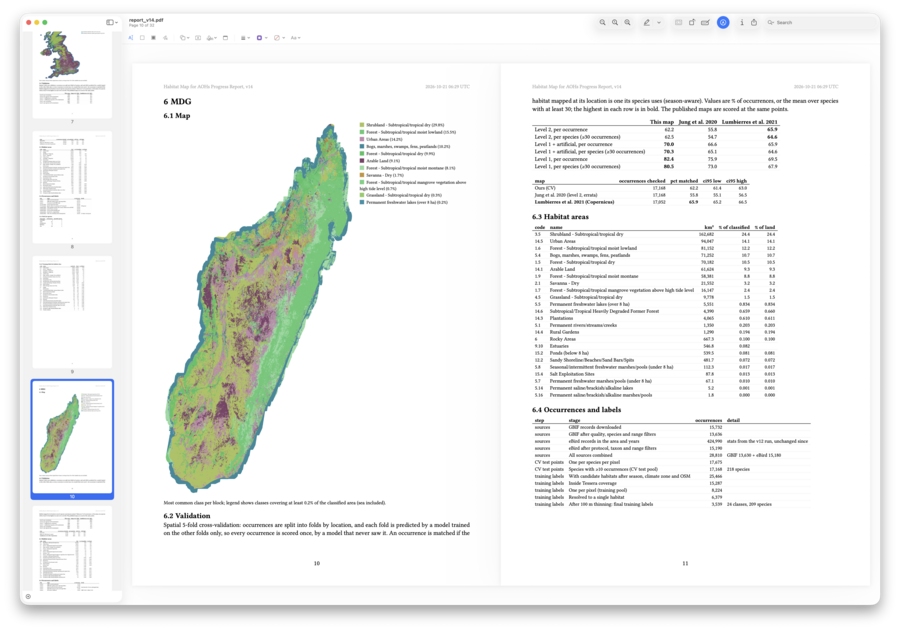
For the habitat map work it has a section per region of interest that shows a small false colour version of the map, the validation results for it versus the other maps people have made, and then some summary stats from different points in the pipeline. There is also a headline graph that shows over consecutive runs how the results are trending.
Then in the appendices it gets very nerdy:
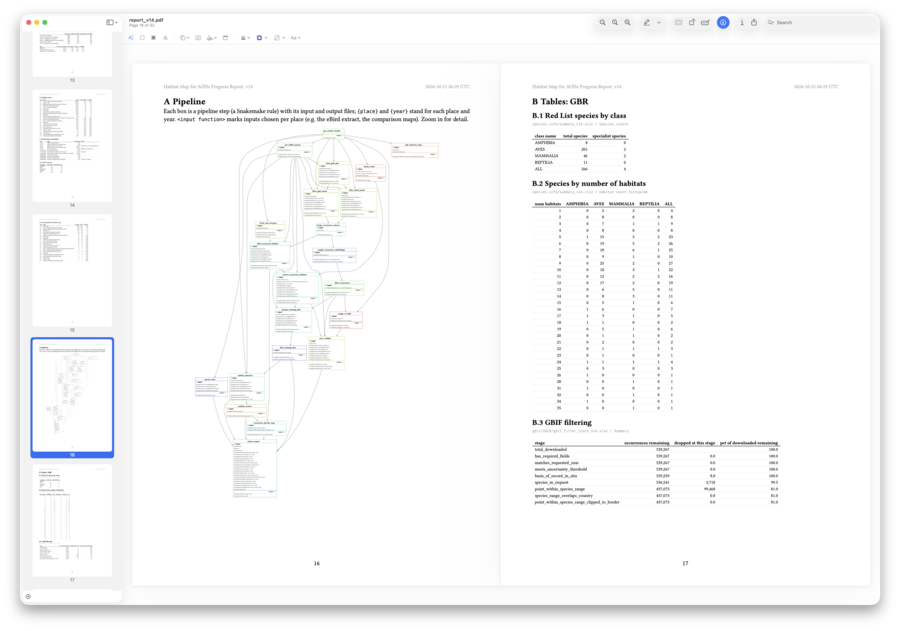
It shows some pipeline metadata, such as this graph of the build stages, provenance information for all the inputs (Zenodo links, file hashes, etc.) plus every intermediary summary I've been generating sorted again by region of interest, so if you do want to see how many amphibians went into that particular run's Madagascar map, it's right there.
This has made me very happy - it suits how I want to consume data, but I hope it also means all this data I generate that is available on request but never read because of that friction point of asking for it, and knowing what is even there, is gone. I imagine in most runs people will not read the data, but if they do have questions all my colleagues will now have the data that I could give them at their fingertips already. Perhaps what they want isn't there, but then they now know it isn't there and can ask for it to be added to future reports.
It also should make a good provenance artefact itself that can be published on Zenodo or such when the output of the pipeline reaches the publication stage. It is something of a transparency report.
Habitat mapping: Snow Coda edition
Back in the early(ish) days of macOS, the 10.6 release Snow Leopard was an atypical release for a commercial operating system in that it promised "zero new features" over the previous year's 10.5 Leopard release: instead they were promising to improve performance and stability for the platform as it matured. Around that time I was leading the engineering team at a small startup on a product called "CODA", and I'd managed to broker with our sales team that for every two feature releases we'd do a maintenance/tech debt pay-off release, which became dubbed "Snow CODA" releases.
For the habitat maps, I also have been trying to keep to a short sprint model, where the sprints are usually a few days to a week, and I try to take one or two items from my todo list, implement those, iterate a little as necessary as they teach me new things about the problem, and then I write up progress and commit all the changes. However, after thirteen sprints I felt that despite my best efforts to keep things clean, the pipeline was looking a little messy, and it was time for a "Snow CODA" or "Snow Leopard" release itself.
From my notes, things addressed in this sprint:
- Removed a few unused files - stand alone scripts to test ideas, or pipeline stages that were no longer needed
- Split the scripts into subdirectories to make it clear what code is used where - with so many pipeline stages a little more structure was needed
- Embedded map colours into output - every time I reviewed data in QGIS I was having to manually load a colour style, and this means me and my colleagues all see the same thing now.
- Maps are now Uint16 rather than Int16 - a small tweak to enable the above
- Add report PDF that summarises a run - as already described in these weeknotes
- Fix pylint and mypy issues - normally I'd do this as a part of commits to code via CI, but this project is new enough I've not added CI yet, so perhaps that's next Snow Coda release.
- Simplify logic to remove old code in places and options no longer used - a smaller version of the first point
Nothing too exciting, but a lot of tidying up for a project so young. But that's the nature of data-science projects I guess: I'm iterating, testing out new ideas, fixing issues as I go to try get to a better place, but even as I try to keep the pipeline small and contained, things always slip by and the project bloats. By doing periodic cleaning iterations like this I can help keep the process lean and help me iterate quicker. It's not science, but it helps the science.
I had to try quite hard to not do anything that changed the data. For instance, in this process I noticed that early on I'd excluded some of the birds from the IUCN Redlist as they have very complex range polygons and they were slowing up the pipeline significantly without impacting the result to any notable degree. However, since I did that the pipeline had changed and they are no longer expensive to process - BUT, I don't want the results to change whilst I do a code tidy up! I want to know in this release I end up with less code, fewer stages, fewer inputs, but I still get the same answer as before. So once iteration 14 was completed, I actually next did a "Snow Data" version to add back that data before I then did the next research related change.
AIS data
My partner and I have for a long time been fans of using sites like Vessel Finder to look up the boats we can see wherever we happen to be, and now that we live by the coast we're using it even more. I think in general it's easier for most people to see planes as the way things move around the world because you often see planes wherever you are, but somehow the fragile web of shipping that sustains most of our current consumer driven society is somewhat invisible, and tools like Vessel Finder help close that as you can see the ebb and flow of all the boats.
The downside of Vessel Finder is that to get full data you need to pay for a subscription, and that subscription is priced assuming you're a shipping company or such, not someone with a general passing interest. But the source data for all sites like this, the AIS shipping data is broadcast live by all the boats: it's how they know where each other are. So, inspired by a similar project planned by Adrian McEwan, we got an AIS antenna (the kind you might put on a small private boat), had it mounted to our chimney, and then bought a dAISy HAT - a small AIS decoder board for the Raspberry Pi, and after a small amount of swearing as I tried to set up OpenPlotter I can now see the ships that are out on the water off the Wirral:
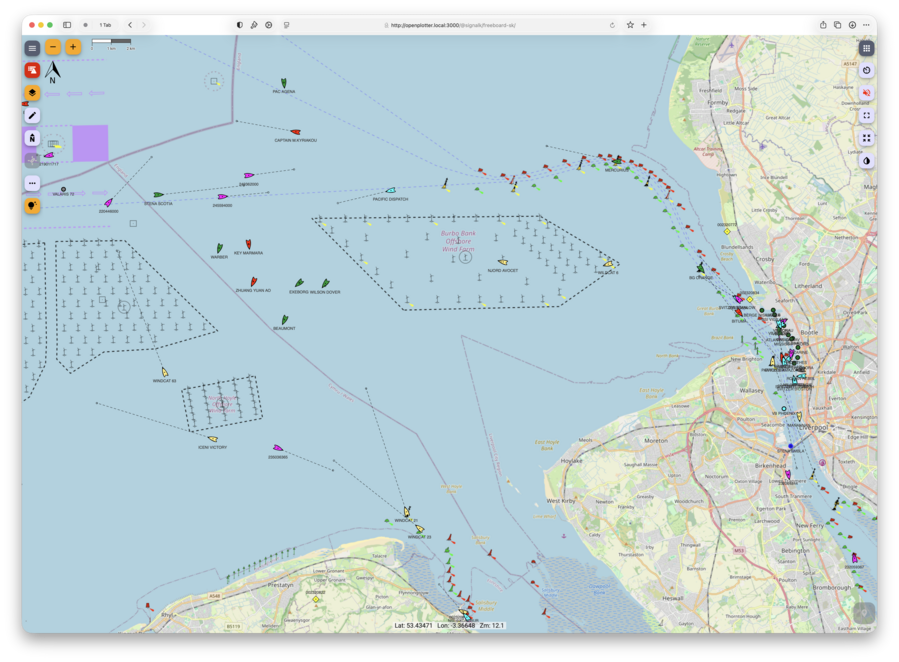
Well worth the frustration at the software stack configuration process and the small injury I took to my hand as I tried to crimp the cable connector 🤦 Given that the antenna is just on the chimney and not on a mast, I'm quite impressed with how much we can see from here: both out beyond the wind farms and over to the Mersey given I live on the Dee Estuary side of the Wirral.
I even 3D-printed a nice case design that someone had shared:
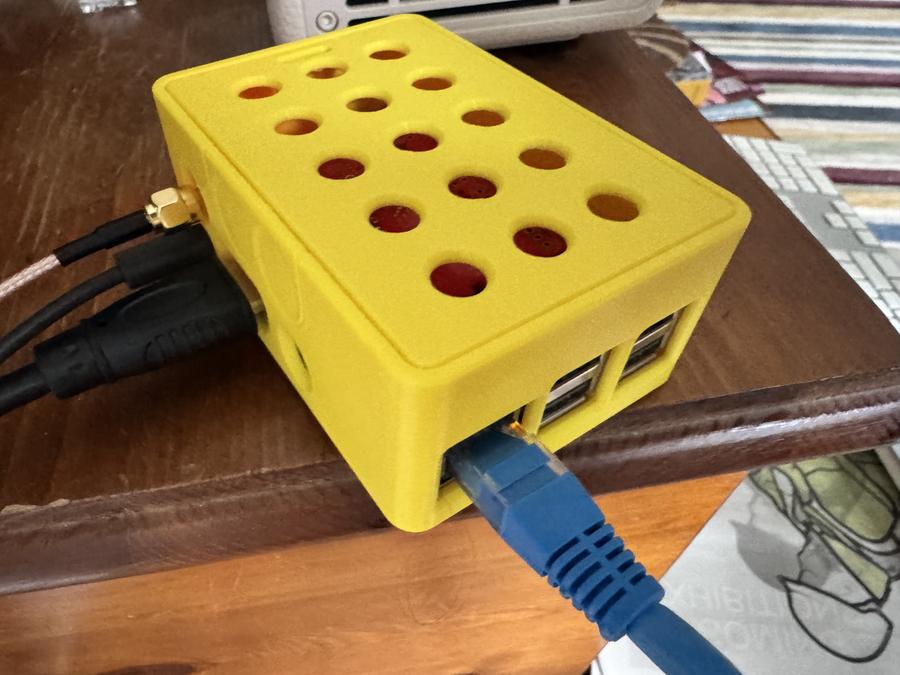
To be fair to the OpenPlotter crew, they've done a good job of pulling together everything you need, just the documentation assumed a bit more knowledge than I had in places, and their install image is a little out of date, so needed a bit of hand holding - I do that for my day job, so it's less fun at the weekend, but I'd still recommend OpenPlotter as a starting point if you were trying to give this a go.
Getting this far is just the first step though. Firstly, the data is only available currently on my local network, and mostly I want to view it when we're going for a walk around the coast or such. Secondly, this is only showing the raw AIS data, and so unlike Vessel Finder doesn't link to detailed ship information which is what we want to see (what kind of boat is that? how big is it? what's it carrying?). Thirdly, I'd like to share the data with friends who are interested in the raw data (e.g., Adrian), so I want to export not only a website, but also a feed of the AIS data itself.
There are several options here. I can share the data with Vessel Finder, which then gets me a free account on their service. This is probably the lowest friction thing, but whilst I have no objection to Vessel Finder, I'd rather find something more open to do with the data. The next obvious destination then would be AISHub which is more of a community effort, but isn't actually open, just not obviously commercial. If you contribute to AISHub you can get access to their data feed via an API, once they've checked your feed is of a suitable quality and is actually reliable. I can absolutely see that there is a cost to doing the curation on AISHub and a cost to coordinating and serving the feed (removing duplicates, etc.), but I wish there was something there for those who can't set up an AIS station or just aren't near water so even if they did they'd fail the data quality checks: shipping impacts us all given how much of the food and goods we consume come over water. If nothing else I work for a landlocked university where I've been part of a group looking at the biodiversity impact of food imports, so I definitely think this data is important!
So I need to look into it some more, but at least I've done the first hard part, setting up the station, before I do the second hard part of working out what to do with the data.
This week
- The server I've been using for the habitat map work is a little unwell, so I suspect I'll have a few days to reflect on progress before computation resumes, which is no bad thing.
- Patrick did something for a potential Claudius submission to Alpaca Festival, so perhaps I can use some of the quiet time for that also.
- Part II projects get their first real supervisions this week, so excited to see where they're both headed.
Tags: weeknotes, habitat mapping, ais, software engineering